
Linux shared Hosting plans and services Hyderabad

Why choose Linux shared hosting: 

  1. Easy Upgrades:

Do you want to work seamlessly without any interruption? Get resources that are reliable and speed up your work with a business plan to pro plan by few clicks. If you are looking to upgrade to other web hosting products such as Reseller Hosting or VPS Hosting, we are ready to help you with our Free cPanel Migrations.

  1. The fastest Websites:

Your websites are known for performing with us. Linux shared hosting plan will deliver fast and reliable services with a lot of efficiencies.

  1. cPanel:

Get your free cPanel offered by us for processing of your websites which is easy to use and has managing features of your website that can be done effortlessly.

  1.  Advanced Security:

Linux shared hosting has many security features with email protection, password-protected folders, leech, and hotlink protection. Your websites are secure from DDoS attacks.

  1. Secure Shell access:

Manage your folders and files by remote access via SSH.

  1.  SNI enabled:

SNI enables the creation of multiple certificates for a server with the same IP address. Install SSL certificate on your domain without purchasing a dedicated IP address.

  1. MySQL, PHP, Ruby, and more:

You can develop your website with the best-known language to you such as PHP, MySQL, Ruby.

  1. 24*7 support:

Our intellectual team will work around the clock to provide you the best services without any break-in.

  1. One-click installer:

our Linux Shared Hosting order includes various script library that automates the installation of web applications such as WordPress and more.

  1. Free website migrations:

Migrate your current website to any other provider using cPanel. This is completely free in Linux Shared Hosting.

Advantages:

  • Easy Setup & Integration: Easy integration with our HTTP API and FREE storefront – Supersite
  • The New web Pro Panel: user-friendly dashboard to manage your products, orders, and customers. Invoice, billing can work on your terms.
  • Responsive Mobile app: You can order, track funds, and renew your plans with few clicks. The Application is available on Android and iOS.
  • Billing & Customer Automation: the management panels will support Billing and Support.
  • Best Prices and Offers: You can make easy profits with competitive pricing and promotions.
  • Proven Scale & expertise: One of the largest wholesale Domain Reseller programs, offering more domain extension
  • 24/7 support: Support can be provided via email, chat, tickets, calls & social media.
  • Learn with Videos & Blogs: Insights based on products, trends, technology, and more from in-house experts and guest contributors. You can learn with videos, blogs, webinars, and more.

Linux Shared Hosting Technical Specifications: 

  1. Databases:
  • MS SQL stored Procedure
  • PhpMyAdmin 4.6
  • MySQL client 5.1
  • MySQL admin tools
  1. Software
  • Perl
  • Python 2.6.6
  • PHP 7.2 more
  • Softaculous
  1. Additional Software
  • Zend Engine
  • Zend loader
  • ion Cube loader
  • Zend Optimiser
  1. Security
  • Hotlink Protection
  • Password-protected folders
  • Leech Protection

Linux Web Hosting Features:

  • cPanel: All Linux Shared Hosting Plans come with cPanel, to make hosting easy for everyone. Setting add-on domains, Emails, FTP, and Databases is convenient with our FREE cPanel.
  • 400+ Apps on your Linux Hosting: Installing, updating, or even rolling back changes to your blog, website, or E-commerce site was never easy! This can be done with just a few clicks.
  • Free Website Transfers: cPanel will help you to migrate your websites for free of cost. You also upgrade your plans from your panel.
  • Email hosting for free: you can access your mails from anywhere with POP3 and IMAP support which is more compatible with desktop clients.
  • Boost website speed: varnish gives a boost to your website to run faster. This will help you to move up your website in ranking in search engines due to fasting loading.
  • Build-in PHP/MySQL: Code in various languages like Ruby, PHP, python to build your websites. This will promote scalability and power.

Product FAQs:

    • What is Shared Hosting?

Shared Hosting is a space where multiple websites share the same server that has shared resources. This is helpful for a personal or business website that is just getting started online. It works great in reducing the cost for all.

    • Is the purchase of a new domain mandatory to buy a Linux Shared Hosting Plan?

Purchasing a new domain is not necessary always. You can use the existing domain for other purposes without buying a new one in Linux shared hosting plans. You can select the option existing domain, and you are good to use another domain.

    • How to manage my Databases and Websites on Linux Web Hosting Plan? 

cPanel is the most powerful and easy-to-use web hosting control panel. Managing your databases and email accounts can be easily done through this web hosting panel.

    • What is the number of websites that I can host on a Shared Hosting Plan?

On a personal web hosting plan, you can host one website/Domain. However, on business pro plans you can host multiple websites and domains.

    • Is an upgrade possible from my current Linux Shared Hosting Plan?

It is an easy and hassle-free process. Our technical team will help you with enhancement activities.

    • Do you also offer Windows Shared Web Hosting?

At the time of opting for a plan, you can choose Linux or windows. That has affordable plans.

    • Is there any money-back guarantee with the Linux Web Hosting services?

A 30-day money-back guarantee with all the Shared Hosting Plans.

Ibase Solutions is offering the best Web Hosting Services at the lowest price. If you want to avail of our services, Contact Us.

We are happy to serve you our best!!!
Which is the Best Web Hosting Control Panel

Which is the Best Web Hosting Control Panel : To choose the Best Web Hosting Control Panel, there are many parameters to keep in mind. There are two specialized control panels you can’t go wrong with are Plesk Vs cPanel. These are the same in a lot many ways, but there are few differences between them.

Plesk and cPanel have a user-friendly interface, with varieties of features.

cPanel is a Linux-based Web Hosting Control Panel that provides tools to manage websites. Plesk is a Windows-based and Linux-based Web Hosting Control Panel for hosting the servers. Plesk has better performance than cPanel.

cPanel came into the market in the year 1996. cPanel has a separate fanbase for its superannuated products. The dashboard has more sectional features. It has a simple layout with considerable options available to users. Easily we can find features such as databases, files, directories.

cPanel Vs Plesk: USABILITY

Plesk is much simpler to use and can be more understandable. It has several tools under which there are many services with lots of information.

cPanel has a command-line interface whereas Plesk was developed using JavaScript technology where we can access it through code languages across many devices. Based on your preference, you can use any of the interfaces.

cPanel Vs Plesk:  security

cPanel has a feature to block the individual IP address, multi-factor authentication, installation of SSL certificates. It takes time to fix security issues. Whereas Plesk provides security features like installation of security patches, monitor plugin updates, anti-spamming inbound and outbound, and fixe the bugs fast.

 Plesk vs cPanel: Distros

cPanel is only ideal for Linux and Plesk can run on Windows and Linux. It has platform compatibility.

Solutions

Plesk

cPanel

OS compatibility

Debian, Ubuntu, CentOS, RHEL, Cloud Linux, Amazon Linux, Virtuoso Linux CentOS, Cloud Linux, or RHEL 7, or Amazon Linux

Web servers

NGINX & Apache

Apache

Admin panel


Unified authorization for end-users and administrators There are two separate logins. One for server-side administrable tasks and the other for website management

Interface

Redesigned UI with modern JavaScript technology Graphical interface

Security

A lot of security features are provided from the box e.g. Plesk Firewall, Antivirus, Fail2ban Auto SSL, built-in support of CSF/ LFD, and some other useful features

Word press support

Word press provides the full list of features and has scalable support cPanel does not have much scalable word press

Extensions/ Add ONS

You can access more extensions and apps from the App catalogue and extension catalogue You can access apps and extensions

DBMS

MySQL Server databases MySQL/MariaDB databases management

SSL

Let’s Encrypt + Symantec Let’s Encrypt

Mobile accessibility

Mobile app for IOS and android No mobile app

Backups

Backups available like Dropbox, Google Drive, and Acronis Need to perform manually from local directory to server

Technologies

Support of Docker, Node.js, WordPress Toolkit One-click HTTPS, Docker, Node. JS & Git can be still supported by cPanel

Bulk Whatsapp Sender Service Hyderabad

Buy bulk WhatsApp sender with license online:

bulk-whatsapp-sender-and-autoreply-botIBase solutions very leading software developing company in Hyderabad. In this precipitous world, everything is more about communication. The transmission of information online is much more based on WhatsApp. It is the best platform to get connected to friends, family, and business purposes.
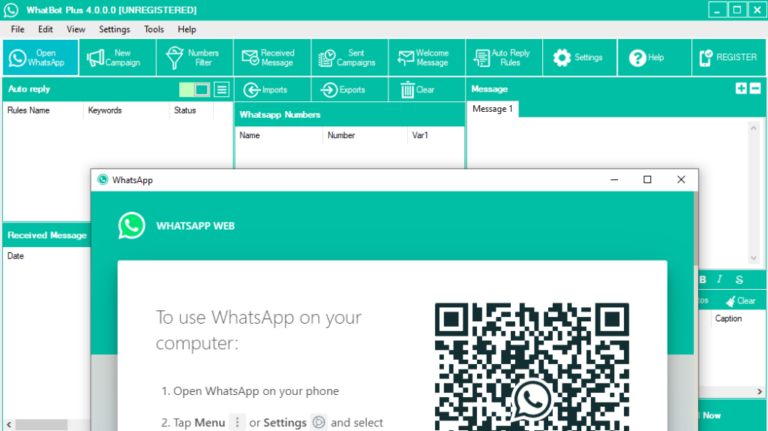
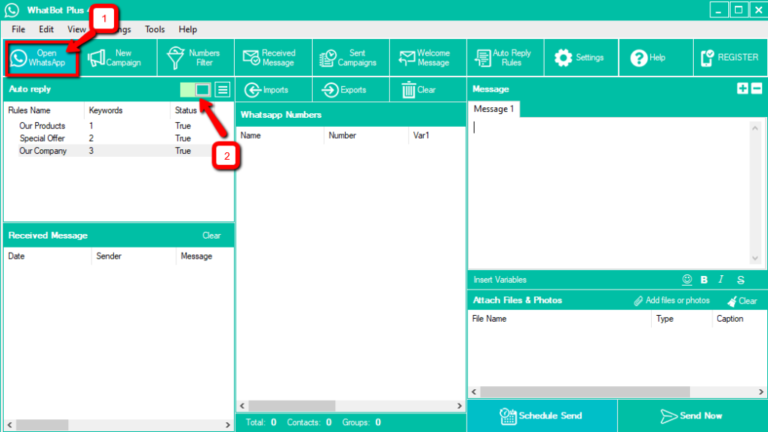
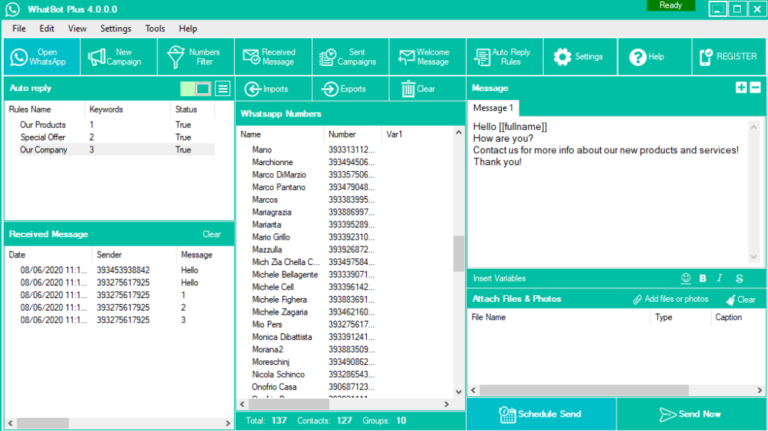
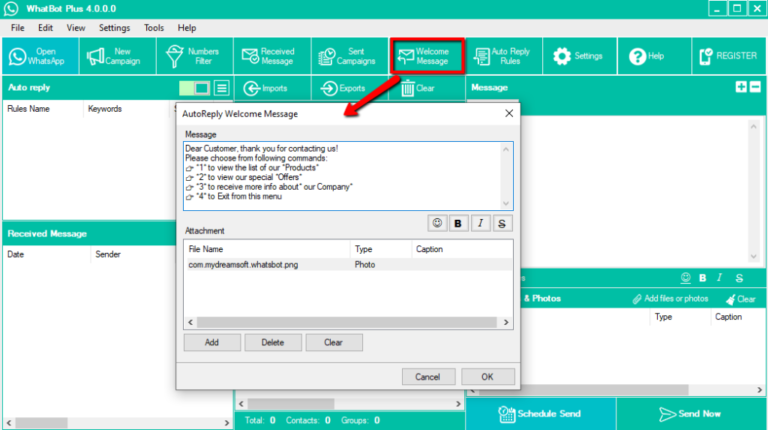
Bulk WhatsApp Marketing Software, which has lost many features like multimedia content sharing, Unlimited message communication, speed control, anti-block feature, contacts filtrate.

Using bulk WhatsApp marketing software, we can share any kind of information to communicate. This platform allows you to share texts, videos, images, and any documents, etc. here, the user can make use of many tools to verify and filter contacts. To extract all the WhatsApp contacts from groups, the Groups Contacts Grabber tool will help you to get them.

This is software is user-friendly, protected and secured, and reliable. The anti-blocking tool reduces the chances to get blocked.

Any user can create and use WhatsApp marketing campaigns and control speed, a delay time between messages and the user can control sleep time.

WHATSAPP MARKETING SOLUTIONwhatbot-autoresponder-enabled-2whatbot-main-schreenshot-1whatbot-welcome

FEATURES OF BULK WhatsApp SOFTWARE:

  • Smooth way of sending messages
  • SMS Scheduling Feature
  • Auto – Reply Chatbots
  • Multiple Account Supported
  • Allows Unlimited Messages
  • Numbers Filter Module
  • Anti Block Functionality With Multi text message
  • WhatsApp Groups Contacts Extractor Module
  • Account Switching in Running Campaign
  • Multi-Language Functionality
  • On – Time Campaign Reports
  • Sleep Control Feature
  • Speed Control Feature
  • Delay Control Feature
  • Groups Verifier Module
  • Dynamic Messages Creation
  • Spin Text Module
  • Compatible With Latest WhatsApp API
  • Allows Unlimited Multi-multimedia message (Images, Videos, PDF, Docs, PPT)

Why Are You Still Waiting?

Buy with license online.

Important things to Creating Wikipedia Pages

Wikipedia is an open-source encyclopaedia that will help to create a world and share knowledge. Anyone can publish an article by registering through this site. Having a Wikipedia page about a company is one of the greatest milestones that can promote your brand beneficially.

Would you like to create a Wikipedia page and share your information?

 It can’t be easy- breezy, but all the efforts you keep into this are worth it.

Reasons to create Wikipedia:

On Wikipedia, there is a dump of knowledge, and you can fetch for anything. It can have any information in the world.

Here are the few intentions to create a Wikipedia page:

  1. Technology developed can be of anything and informative.
  2. Your work is noticeable, if you are a founder, it is determined by Wikipedia and considered as a good individual asset of it.
  3. Wikipedia doesn’t let you find information about your topic.

The following steps will help you out in creating Wikipedia Page:

  1. Do your analysis and scrutinization:

Before publishing your content on the page, kindly read the guidelines of the Wikipedia community. It will help you find the challenges on your page. Your content should be verifiable. It is always good to review your page to avoid conflicts. Your content should be unbiased, reliable, and secondary. Once you submit your page for the reviewer process, it might take a few days for approval.

  1. Create an account:

This space is for contributors, admins, and editors. You can be one of these by creating an associated account of it. To upload any piece of information or to edit the content, you need to log in with an email address.

  1. How to begin:

Initially start by doing small changes on the existing web pages so that you will get the knowledge of Wikipedia’s page and the management tool, how the content is managed. Every change you do from your account is recorded under your profile. By doing this you’ll get familiar with how Wikipedia works.

  1. Collect article related info:

Take enough time to collect the information that is related to your article. Your content should be unique and informative and everything that you upload from your account is verified. Do not duplicate the information that already exists. You need an arbitrator to support your article it might be websites, videos, journals, or any other articles.

Keep your article simple and straight, and you can’t be incriminated forms-interpretation.

  1. Creating Draft:

Once you log in with your account, To modify the content on your page, you can add your page to the sandbox. Reliable references should be provided to your article. The minimum size of the article is 1500 words, and it should be less than 5000 words. Before publishing your article ask someone to review your article.

  1. Prepare to submit for review:

Here is the last step, submitting your article for reviewing process. Make sure it has followed all the regulations. It is a moderate hey process, it might take few days or few weeks to get a response for your approval process. You need to get through this process in a more efficient way.

Once your article is live, all your efforts are paid off. But there are also the same chances of the article being deleted.

Editors might do some changes to your articles like changes in the title and additional comments also be added for the improvement of the article. Make sure you are monitoring your page to get identified the edits that are done on the page.

I hope this article adds a little more knowledge to you in creating Wikipedia pages.